Blog Summary: Choosing the wrong web-to-print solution can slow down your print business and increase operational costs. This buyer’s guide breaks down the key factors to evaluate so you can confidently select the right platform. Read on to make a smarter decision.
Selecting not the best-fit web-to-print (W2P) solution can be a costly mistake for print service providers. The platform you select becomes the backbone of your online print business, handling storefronts, order intake, customer interactions, and production workflows. If the software lacks flexibility, automation, or integrations, it can slow down operations, create inefficiencies, and limit your ability to scale.
At the same time, the market offers dozens of web-to-print platforms, each promising powerful capabilities. This makes understanding the web-to-print technology a necessity to confidently evaluate different vendors for your print business.
This buyer’s guide will help you understand how to choose the most efficient web to print solution for your business by outlining the key evaluation criteria, common vendor red flags, and essential questions to ask before making a decision.
Who Needs a Web to Print Solution?
A web-to-print solution is ideal for print businesses that want to accept orders online, automate workflows, and provide customers with convenient ordering experiences through digital storefronts.
In fact, nearly 81% of enterprises that invested in web-to-print platforms reported meaningful operational cost reductions within their first year of deployment.
Businesses that commonly benefit from web to print for print service providers include:
- Commercial print service providers
- Trade printers
- Franchise print networks
- Marketing and print agencies
- Corporate in-plant print departments
- Photo product and merchandise printers
For these businesses, adopting a W2P platform can streamline order management, improve customer experience, and enable scalable growth.

Standard vs Custom Web-to-Print Solutions
When choosing web to print software, one of the first decisions print businesses face is whether to adopt a standard platform or build a customized solution.
Standard Web-to-Print Platforms
Standard web2print platforms are pre-built software solutions designed specifically for print businesses. They come with core features such as online storefronts, design editors, and order management tools.
Advantages include:
- Faster implementation timelines
- Lower upfront investment
- Proven features based on industry use cases
- Continuous updates and improvements
For many print businesses, standard platforms provide a reliable starting point while still offering configurable options to match operational needs.
Custom Web-to-Print Solutions
Custom w2p solutions are developed specifically for a business based on its unique workflows, integrations, and customer experience requirements.
Benefits include:
- Fully tailored functionality
- Highly customized storefront experiences
- Specialized workflow integrations
However, custom development often involves higher costs, longer development timelines, and ongoing maintenance requirements. Many modern platforms provide configurable capabilities that balance flexibility with faster deployment, such as custom web-to-print solutions offered within enterprise-ready platforms.
Key Factors to Evaluate When Choosing a Web-to-Print Solution
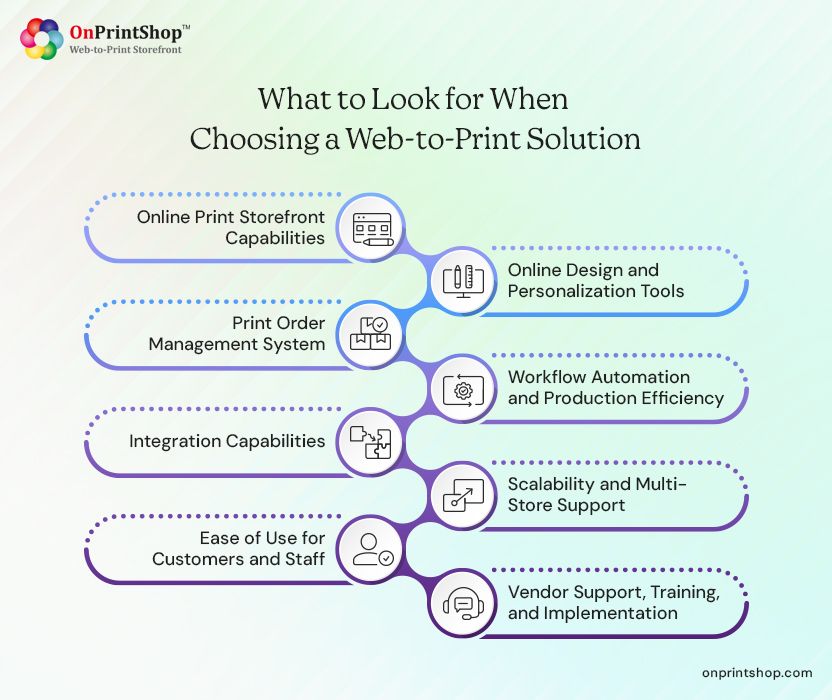
When evaluating the best web to print solution, print service providers should focus on several critical capabilities that determine how effectively the software supports business growth and operational efficiency.
Below are the most important factors to consider.
1. Does It Have the Capabilities You Need?
A strong web-to-print platform should provide customizable storefronts where customers can browse products, upload files, and place orders easily.
Important features include:
- Customizable product catalogs
- Tier-based pricing and customer-specific catalogs
- Order tracking and account management
- Mobile-friendly storefront design
Depending on your customer base, you may require dedicated storefronts such as B2B Web-to-Print storefront portals for corporate clients or B2C Web-to-Print storefront solutions for retail customers.
2. What Online Design and Personalization Tools Does It Offer?
An intuitive online design editor is essential for enabling customers to personalize print products directly from the browser.
Key capabilities to look for include:
- Template-based product customization
- Drag-and-drop design editing
- Variable data printing for bulk personalization
- File upload and proofing options
Platforms with advanced editors, such as the comprehensive web-to-print online designer, can significantly enhance the customer experience while reducing manual design work for print teams.
3. Is the Print Order Management System Compatible?
Managing print orders efficiently is critical for operational productivity. An end-to-end web to print order management system centralizes all order-related activities.
Essential features include:
- Centralized order dashboard
- Job tracking and status updates
- Automated invoicing and approvals
- Customer communication tools
A print order management solution that help streamline your entire order lifecycle from submission to fulfillment.
4. Can It Automate Your Print Workflow and Improve Production Efficiency?
Automation plays a key role in improving efficiency for modern print businesses. A good W2P platform should integrate seamlessly with production workflows to reduce manual intervention.
Look for automation capabilities such as:
- Automated job routing
- Preflight checks for uploaded files
- Production scheduling
- Integration with printing equipment or MIS systems
Tools such as modern print workflow automation software can significantly reduce manual tasks and accelerate order processing.
5. Does It Support Integration Capabilities for Your Favorite Tools?
Modern print businesses rely on multiple digital systems. Your web-to-print platform should integrate with essential tools across the business ecosystem.
Common integrations include:
- CRM platforms
- Accounting software
- Payment gateways
- Shipping carriers
- ERP or MIS systems
Ensure smoother data flow with strong w2p integration capabilities and reduce operational silos across departments.
6. How Extensive Is Its Scalability and Multi-Store Support?
As print businesses grow, their technology should scale accordingly. A scalable web to print solution for print business should support expanding product lines, customer segments, and storefronts.
Scalability features to evaluate include:
- Multi-store management
- Franchise or reseller storefronts
- Multi-location order routing
- Enterprise-level security and performance
These capabilities allow businesses to expand their digital print ecosystem without changing platforms.
7. Is It Easy to Use for Customers and Staff?
Even the most feature-rich software can fail if it is difficult to use. A user-friendly platform ensures faster adoption among customers and internal teams.
Look for:
- Intuitive customer ordering workflows
- Easy product configuration tools
- Simplified admin dashboards
- Minimal training requirements
Ease of use directly impacts customer satisfaction and operational productivity.
8. Does It Provide Vendor Support, Training, and Implementation?
Technology alone does not guarantee success. Reliable onboarding and ongoing support from the vendor are equally important.
Before selecting a platform, evaluate:
- Implementation assistance
- Training resources and documentation
- Technical support availability
- Product roadmap and updates
Guide to execute Web-to-Print implementation project can help businesses understand how a smooth deployment process should look.
Red Flags to Watch Out for in W2P Vendors
Not all vendors provide the same level of reliability or innovation. Identifying potential red flags early can help avoid costly mistakes when performing web to print vendor evaluation.
Watch out for:
- Limited integration options with existing business tools
- Rigid storefront customization capabilities
- Hidden setup or implementation costs
- Poor onboarding or training support
- Outdated user interfaces or slow platform performance
- Lack of a clear product development roadmap
Evaluating vendors carefully can help ensure long-term success with your chosen platform.
Questions to Ask Before Signing with a Web2Print Provider
Before committing to a web-to-print platform, print businesses should ask vendors several important questions to assess suitability and long-term compatibility.
Consider asking:
- How long does the implementation process typically take?
- What integrations are supported out of the box?
- Can the platform support both B2B and B2C storefronts?
- What customization options are available for workflows and storefronts?
- How frequently are software updates released?
- What level of training and onboarding support is provided?
Guide to web-to-print software can further help businesses evaluate different platforms effectively.
Why Many Print Businesses Choose OnPrintShop
Many print service providers choose comprehensive platforms that combine storefront management, automation, and integrations within a single ecosystem.
For example, Web-to-Print Software by OnPrintShop provides a complete solution designed for print businesses looking to manage online storefronts, automate workflows, and scale operations efficiently.
The platform supports capabilities such as customizable storefronts, order management tools, and workflow automation through an advanced Web-to-Print SaaS solution. By combining multiple operational tools within one platform, print businesses can streamline processes while improving customer experience.
ConclusionSelecting the right web-to-print platform is a strategic decision that can significantly impact your print business’s growth, efficiency, and customer experience. By evaluating key factors such as storefront capabilities, automation features, integrations, scalability, and vendor support, print service providers can make a more informed choice.Taking the time to compare solutions and ask the right questions helps ensure that your chosen platform aligns with both your current operations and future expansion plans.If you're exploring modern web-to-print platforms designed to streamline print workflows and online ordering, you can learn more about the next-gen web-to-print solution and how it helps print businesses build scalable digital storefronts.